

Maintenance
Two admin tools help you tidy up what code and content changes leave behind:
- Stranded component groups are groups still attached to a page that your templates no longer show. The admin bar warns about them on the page.
- Orphaned resources are components, positions, groups and stored files that nothing uses any more. You review and delete them at
/_cwa/orphaned.
Neither tool deletes anything without you confirming it. For a tour of everyday editing, see The Admin Panel.
Stranded Component Groups
A page can have component groups attached that nothing in your code shows any more. The usual cause is renaming a group's reference: <CwaComponentGroup reference="hero"> becomes reference="banner", the page gets a new, empty banner group, and the old hero group stays attached with all its content. Visitors no longer see that content, and nothing else tells you.
When this happens, a warning icon with a count appears beside Edit / Done in the admin bar. It counts the stranded groups: groups attached to the layout, to the page at any depth, or to a component on the page, whose reference no <CwaComponentGroup> in your templates declares for that owner. It appears once the page has loaded, whether or not edit mode is on.
The check reads your code, not the rendered page. At build time the module scans your layout, page and component templates in app/app/cwa/, including each component's ui/ variants, for <CwaComponentGroup> declarations. In dev the scan runs again whenever a .vue file changes. A group behind a v-if, in a closed tab or in a lazy component counts as declared, even though it isn't mounted yet.
It finds:
- a renamed
reference - a group on a page or component whose template, or the UI variant it has selected, no longer declares it
- a group on the layout that no template in the app declares
- an older group keyed to a component's draft IRI, left behind after the component was published
<CwaComponentGroup> directly in a template, or in an ordinary component that the template uses by its tag. The scan follows auto-imported tags, default imports, #components imports and defineAsyncComponent(() => import('…')). It can't follow a component rendered through <component :is>, h() or resolveComponent(), so a group declared only inside one of those is reported as stranded, even though visitors see it. A wrapper component that receives location as a prop and passes it to <CwaComponentGroup> is fine.The reference is read from the declaration, so give it as a plain string: reference="hero" or :reference="'hero'". The location is recognised when it's :location="iri" or publishedIri in the template itself, $cwa.resources.layoutIri.value, or a fixed location-reference. Any other location, such as a prop in a wrapper, matches that reference on any owner.
Reporting switches off for the whole site, rather than guessing, when a template or a component it uses can't be read:
- the template isn't HTML, such as
lang="pug" - the file or its script doesn't parse
- a
<CwaComponentGroup>takes its props from an object withv-bind="…" - a
<CwaComponentGroup>has a computedreferenceand a location the scan doesn't recognise, such as a wrapper that passesreferencedown as a prop
The build warns once for each file and reason that switches reporting off, so you can fix it:
stranded component group warnings are off for the whole site, because <file> binds reference at a location that cannot be classified, so it could declare any group. Pass a literal reference, or a location the module recognises (the template's iri or publishedIri, the layout IRI, or a literal location-reference).
The reason is one of could not be read, could not be parsed, has a template that is not HTML, binds its props with a v-bind object, or binds reference at a location that cannot be classified. Only files reachable from a CWA template are scanned, so a wrapper nothing uses never warns.
A layout, page or component whose template the scan didn't see is skipped, and none of its groups are reported.
Click the icon to open Stranded component groups. Each group is listed by its reference, with its IRI and the components in it, and has two actions:
- Merge: pick a group the page shows from Merge into…, then click Merge and confirm. The components move to the end of that group, in their order, and the emptied group is deleted. An empty group can't be merged; delete it instead. A group with a component limit (see
<CwaComponentGroup />› Limiting the Number of Components) is offered only if it has room for every component being merged. - Delete: deletes the group after the usual confirmation. Like any group delete, it takes its positions with it, and any component in them that isn't used anywhere else.
allowedComponents doesn't include its type, the original group is kept and the modal lists the components that didn't move. The others have already moved to the target group.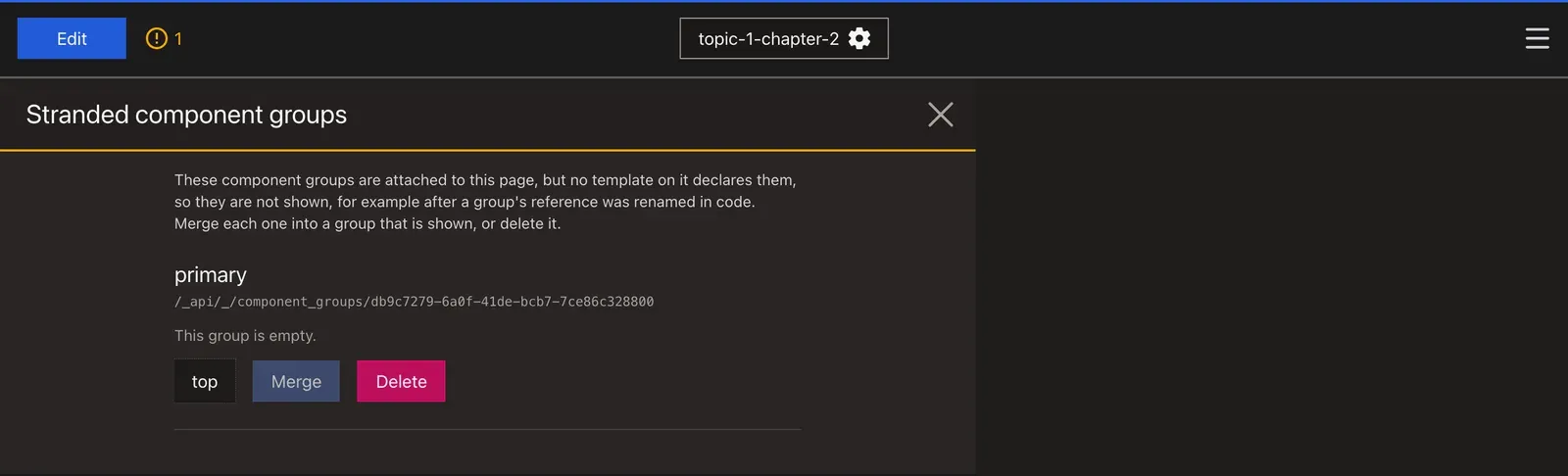
Orphaned Resources
Content you remove from a page can leave records behind: a component nothing displays any more, an empty position, or a group nothing owns. Uploads can leave stored files behind too. The API can report these, and the admin lets you review and delete them. What counts as orphaned is set by the API, see Orphaned resource report.
Scanning from site settings
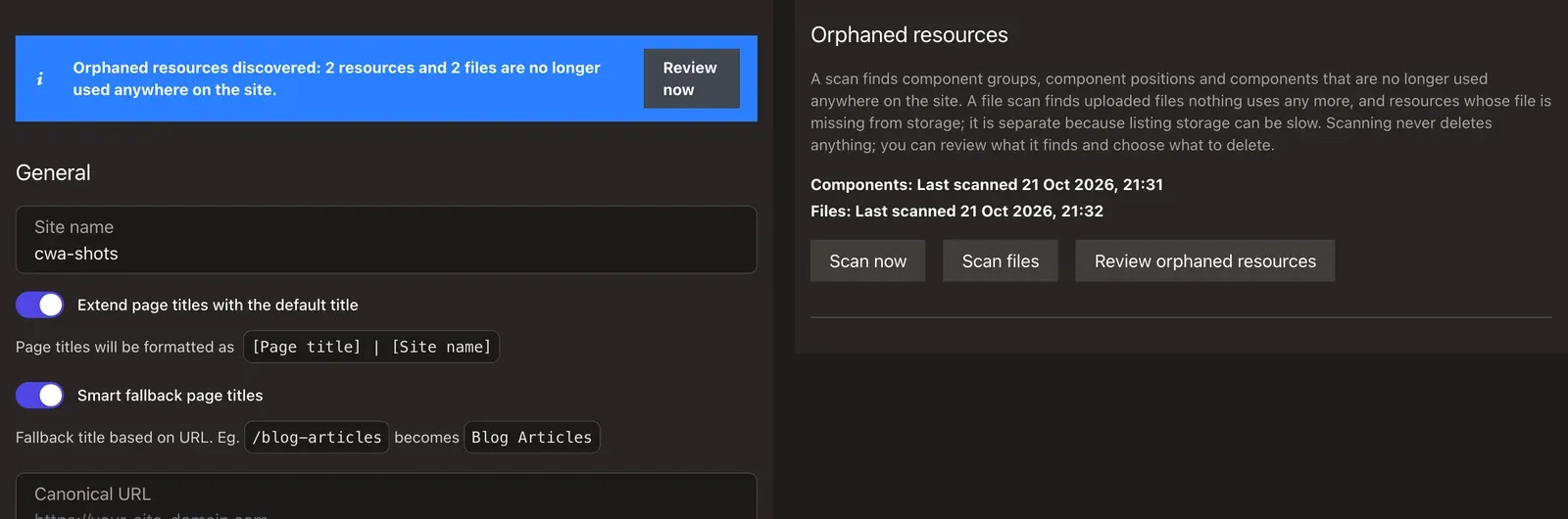
Site settings (/_cwa/settings) has an Orphaned resources section. It shows when each report was last scanned, as Components: and Files: lines, or Never scanned, with three buttons:
- Scan now asks the API for a new component report.
- Scan files asks the API for a new file report. It is separate because listing storage can be slow.
- Review orphaned resources opens
/_cwa/orphaned.
When the last scans found anything, a notice at the top of settings reads "Orphaned resources discovered" with a Review now button. It counts orphaned resources and orphaned files, then missing files and invalid files separately, for example "2 resources and 1 file are no longer used anywhere on the site. 1 file is missing from storage. 2 files no longer meet their upload rules." Unknown files aren't counted.
Opening settings only reads the stored reports. It never starts a scan, so each report is only as fresh as its last scan. The component report is refreshed by Scan now, a delete on /_cwa/orphaned, or the API's scan-orphaned command, which can run on a schedule and email you when the orphans change (see Orphaned Data › Emailing When Orphans Change). The template's production deploy runs it every day at 03:00 London time (see Daily Orphan Scan), so there the component report is at most a day old. The file report is refreshed by Scan files, a file delete on /_cwa/orphaned, or the API's scan-orphaned-files command.
After a scan is requested, the page reads the report again every 2 seconds, for about 10 seconds, until its scan time changes. If the API queues the scan for a Messenger worker, the report only changes once a worker runs it, so with no worker running the page shows "The scan has been requested but has not finished yet" and the report stays as it was. The worker setup is in Orphaned resource report.
Reviewing and deleting
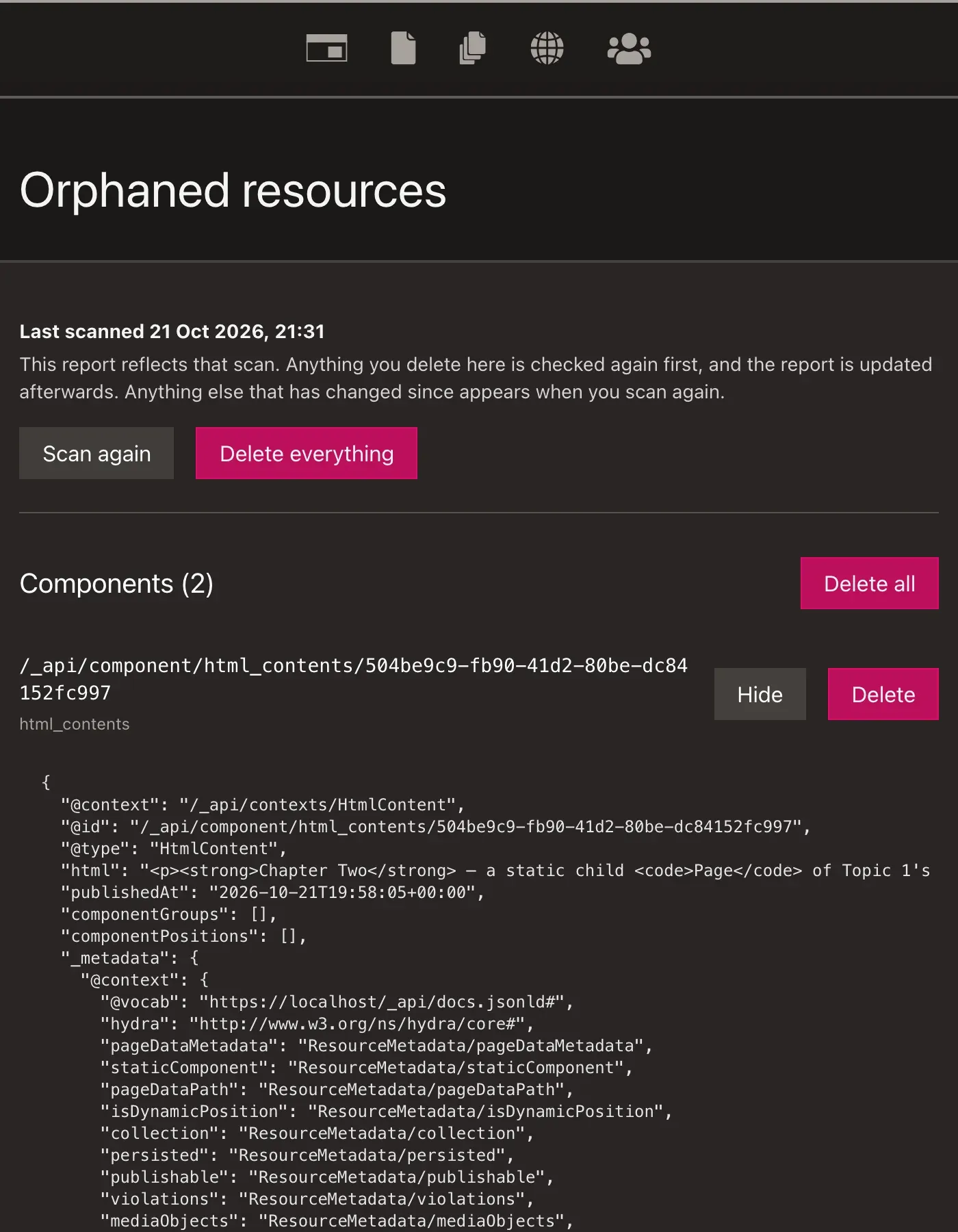
/_cwa/orphaned shows the last component report in three sections: Components, Component positions and Component groups, each with its count. Before the first scan it has a Scan button instead. The page doesn't link from the admin menu; open it from site settings.
Each row shows the resource's IRI (and, for a component, its collection) with two buttons:
- View shows the resource's data as JSON. For a component this is the published version, or the draft if the component was never published.
- Delete deletes that resource.
Each section with rows has Delete all, which deletes that section's rows. Delete everything asks the API to delete every orphan it finds when it checks again, including anything that has become unused since the last scan. Every delete asks you to confirm first.
- A component group takes its positions with it, and any component in those positions that isn't used anywhere else.
- A component takes its own component groups, unless something else uses them, along with their positions and the components used only there.
Delete, Delete all and Delete everything each send one request to POST /_/orphaned_resources/delete. The API checks each resource again first and deletes only what is still orphaned, along with what it contains, and an orphaned component takes its unused draft with it. It then refreshes the stored report, and the page reads it again.
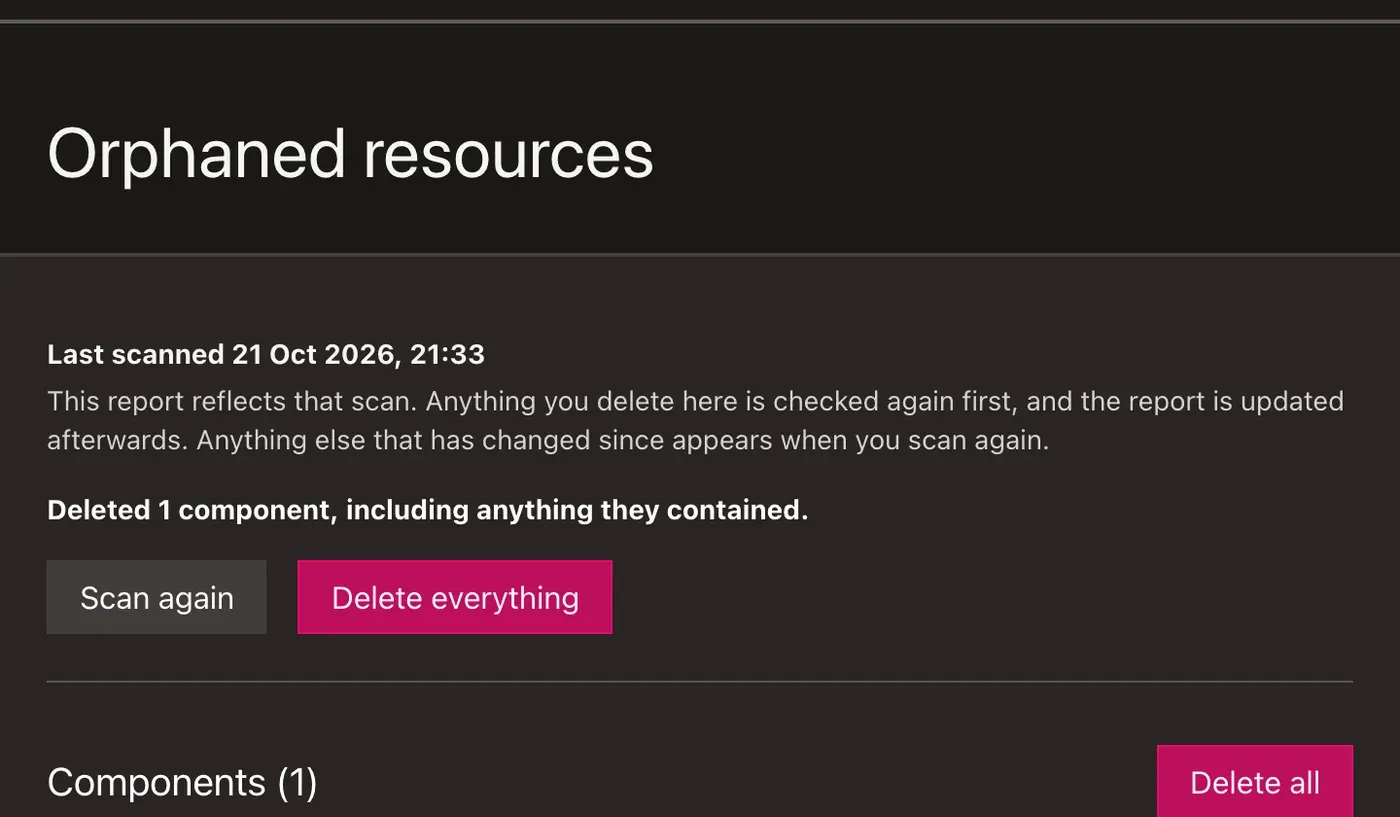
Above the buttons, the page then says what was deleted, counting everything the delete took with it, such as "Deleted 2 components and 1 component group, including anything they contained." If nothing went, it says "Nothing was deleted." Each resource you asked for that wasn't deleted is listed with its IRI and the reason:
| Reason | Meaning |
|---|---|
| Kept: it is in use again, or it is a draft. | The API's fresh check didn't find it orphaned: something uses it now, or it is a draft copy. |
| Already gone. | It no longer exists. |
A report can be minutes old, so something may have been reused since. The rest of your selection is still deleted.
The page shows the report the API stored after the delete. Anything else that has changed since appears when you click Scan again.
Orphaned files
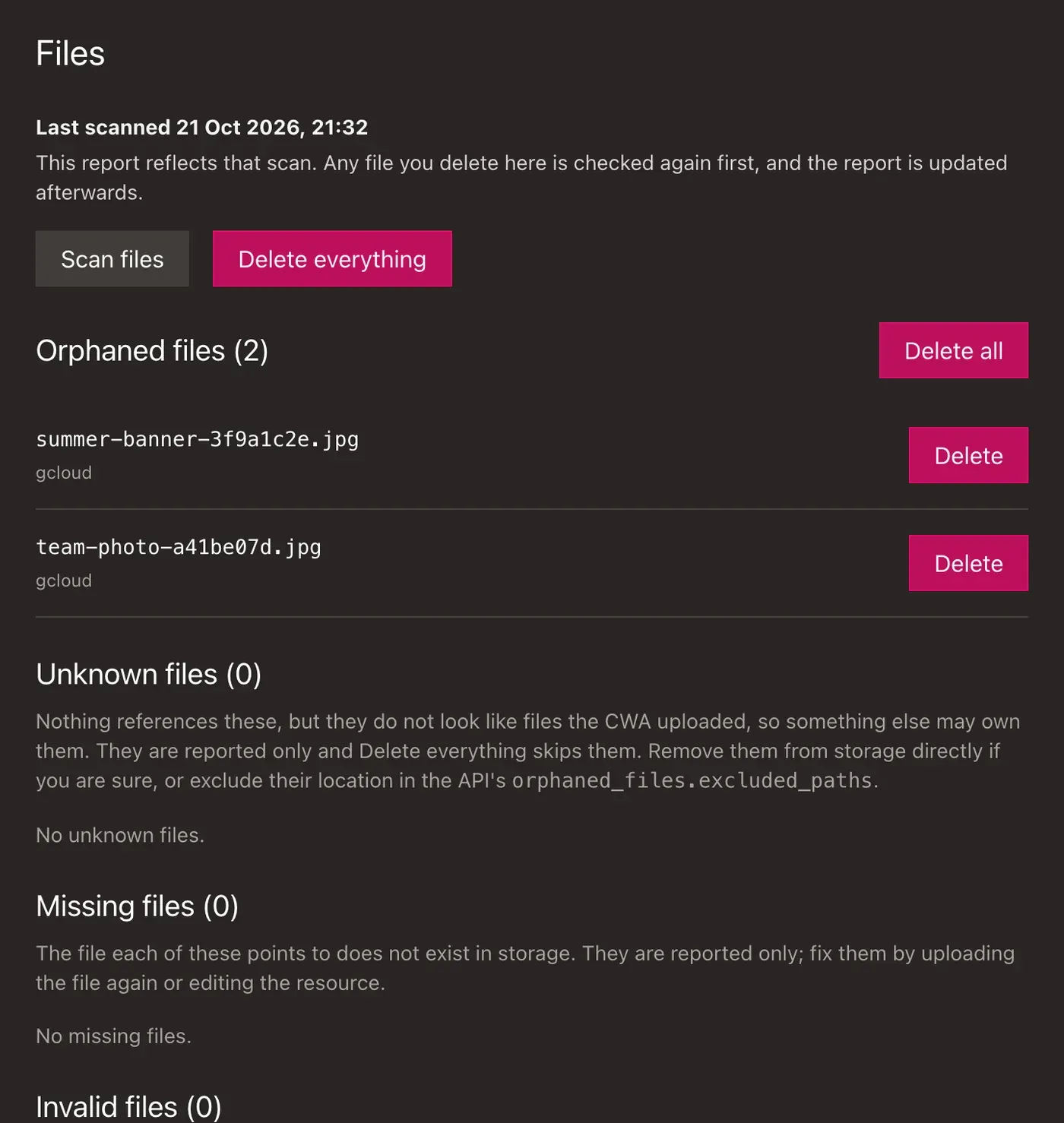
Below the component report, /_cwa/orphaned has a Files report with its own Scan files button. A file scan looks at the storage your uploadable fields use and finds stored files that nothing references, resources whose file is missing, and files in use that break their upload field's current rules. Before the first file scan the section has only the Scan files button. The scan request and the 2-second re-reads work as for components.
The report has four sections. Each row shows the file's path and its storage adapter.
| Section | What it lists | What you can do |
|---|---|---|
| Orphaned files | Files nothing references that the API can show it uploaded | Delete one, Delete all listed, or Delete everything |
| Unknown files | Files nothing references but that don't look like CWA uploads, so something else may own them | Nothing. Remove them from storage yourself if you are sure, or exclude their location with the API's orphaned_files.excluded_paths |
| Missing files | Resources whose file doesn't exist in storage, with the resource's IRI | View shows the resource. Fix it by uploading the file again or editing the resource. Nothing here deletes it |
| Invalid files | Files in use that break their upload field's current rules, such as an image uploaded before a maxPixels limit was added. A published or scheduled resource is also checked against the rules its publishing checks (see How Invalid Files Are Checked). Each row links the resource's IRI to the resource in the admin, and shows the field and every rule the file breaks | Nothing. Open the resource and upload a replacement (see Replacing a Stored File) |
Every delete asks you to confirm, then goes to the API, which checks each file again and deletes only what is still orphaned. Delete removes the path from every adapter where it is orphaned. Delete everything also deletes files that have become unused since the last scan, and never touches unknown, missing or invalid files. The page then reads the report again and says what happened, such as "Deleted 3 files.", with each path that was kept and why:
| Reason | Meaning |
|---|---|
| Kept: something references it again. | A resource uses the file now. |
| Already gone. | The file no longer exists. |
| Could not be deleted from storage. | The storage adapter refused or failed the delete. |
| Kept: it does not look like a file the CWA uploaded, so it is never deleted from here. | It is an unknown file. |
Deleting a resource also deletes its stored files, however it is deleted, so orphaned files should be rare. What the API scans and which files it will delete are described in Orphaned files report.