

Draft & Publish Workflow
Every publishable resource has two versions: a draft and a published version. The live site always shows the published version. Editors change only the draft. Nothing goes live until they explicitly publish.
publishedAt: none, or a future time- a copy, made by the first edit to the published version
- what the live site shows
- keeps its IRI when a draft is published
Publish sets publishedAt to "now", or a scheduled time arrives. The draft's fields are copied over the published version, and the draft is removed.
The Problem It Solves
Without a draft system, every edit is immediately visible to all visitors. A content editor halfway through rewriting a section would show a broken state to the public. The draft/publish workflow eliminates this.
How It Works
For anonymous users: the API returns the published version of every resource.
For signed-in users with publish rights: the API returns the draft version. This is decided from the auth cookie and the user's role — not from whether edit mode is toggled on — so an admin sees drafts on every page view, not just while editing. The module adds no published parameter when it loads a page. Add ?published=true to a request to force the published version; the admin does this for its writes when an editor turns on Edit live version in the Publish tab. Edits via useCwaResourceModel (the debounced v-model binding) patch the draft.
When an editor publishes: a PATCH with "publishedAt": "now" promotes the draft to the published version, timed by the API server's clock. A Mercure event broadcasts the change to all open browser sessions.
When an editor schedules a publish: the draft's publishedAt is set to a future time from the Publish tab, and the draft replaces the live version at that time. See The Admin Panel › Scheduling a Publish.
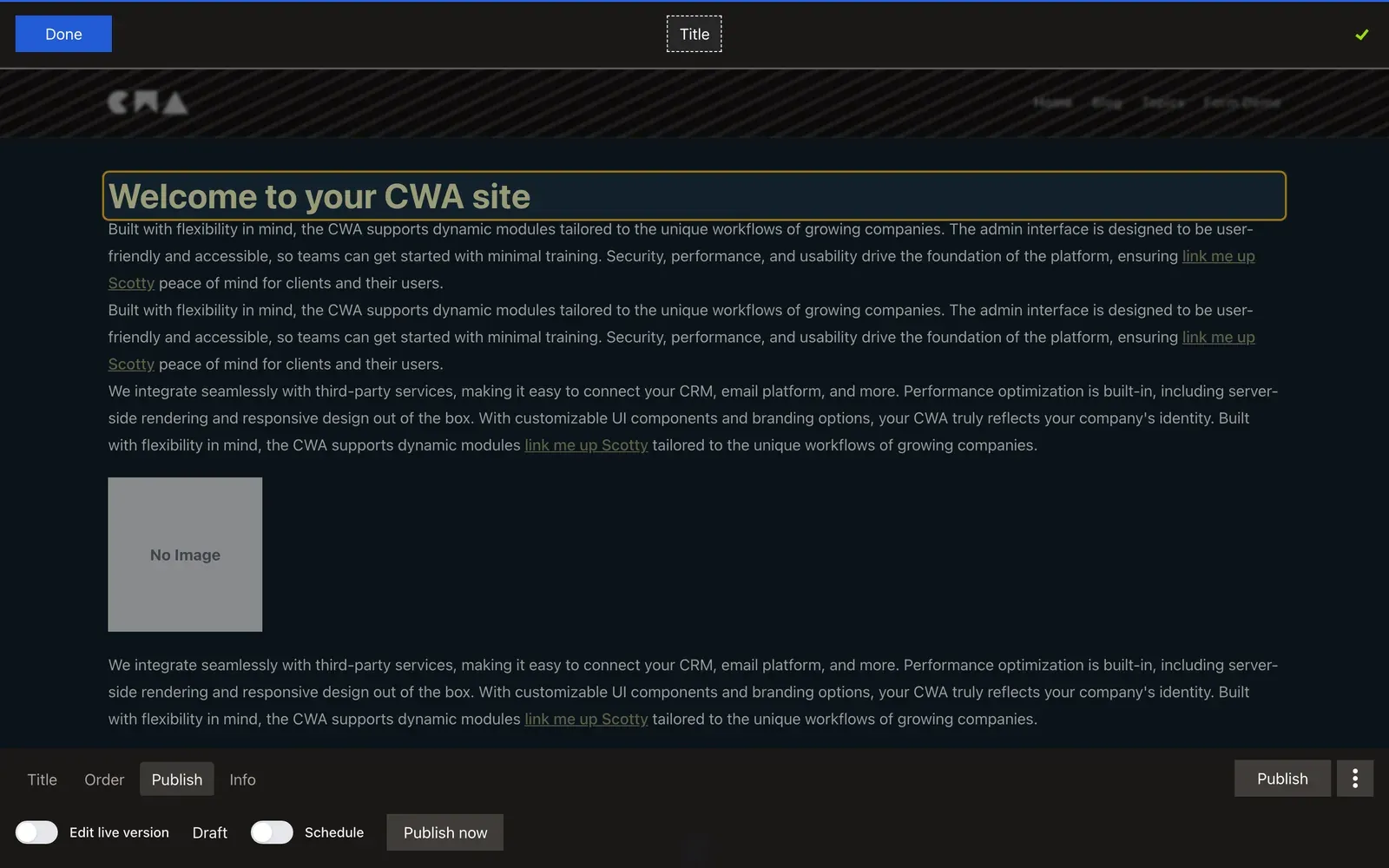
The PHP Side
#[Silverback\Publishable]
#[ApiResource(mercure: true)]
#[ORM\Entity]
class Title extends AbstractComponent
{
    use PublishableTrait;

    #[Assert\NotBlank(groups: ['Title:published'])]
    #[ORM\Column(type: 'text', nullable: true)]
    public ?string $title = null;
}
#[Silverback\Publishable]+PublishableTrait— the API bundle manages the draft/published twin automaticallypublishedAtis set on the published version when it goes liveAssert\NotBlank(groups: ['Title:published'])— validation only runs at publish time, not when saving a draft. This lets editors save incomplete work
Validation Groups
The groups: ['Title:published'] constraint pattern is important:
- Saving a draft: no
Title:publishedvalidation → empty title is allowed - Publishing: runs the
Title:publishedvalidation group → empty title fails
This prevents publishing invalid content while still allowing in-progress work to be saved.
Real-Time Updates
When the published version changes, Mercure broadcasts the update. The Nuxt module holds the new content back and shows a notice: The content on this page is outdated, with an Update button. Clicking it shows the new content without a page reload. There's no polling. A signed-in admin gets no notice: another admin's save, draft or published, appears in place. See Real-Time Updates.
Adding, Removing and Reordering Are Immediate
PublishableTrait applies per-component — the draft/publish distinction lives on each individual component entity. But adding or removing a component from a group (creating or deleting a ComponentPosition) is a separate operation with no draft state of its own.
When an editor adds a new component to a group via the inline editor, a ComponentPosition record is created immediately. A publishable component itself starts as a draft (no publishedAt), so it is invisible to anonymous visitors — but the position exists from that moment. Publishing the component makes it visible; deleting it removes both the component and its position.
Reordering is the same: the new order is saved straight away, so visitors see it at once.
There is no "undo" for position changes beyond deleting the position. A layout's groups work the same way: adding a nav link to a shared navigation group creates its position at once, on every page that uses the layout, but a publishable link component placed in it stays a draft, hidden from visitors, until it's published.
Scheduling a Whole Page
Draft and publish work per component. To hold back a whole page, or take one offline, use its route's go-live date instead. A route can be Live, Scheduled for a date and time, or Not live; until it is live, visitors get a 404 and the page stays out of the sitemap, while admins can still preview and edit it. A scheduled parent holds back every page nested beneath it.
Set it from the route's Visibility setting in the admin — see The Admin Panel › Visibility — or through the API, covered in Scheduling and Taking Routes Offline.
Next: The Admin Panel
The Admin Panel tours where editors do all of this.