

Your First Layout
Your new project already has a working site. The template ships a layout (app/app/cwa/layouts/primary.vue, plus a minimal secondary.vue), a page template (app/app/cwa/pages/PrimaryPageTemplate.vue) and a Title component, and its fixtures seed a home page that uses them. Open those files as working references.
These three guides build new ones beside them: a landing layout, a two-column page template, and a Quote component. By the end you'll have a page at /landing that uses all three.
uiComponent, component group, edit mode and manager panel. Key Ideas explains each one in a sentence or two.app/ and its source directory is also app/, so CWA's Vue files are in app/app/cwa/. See Where things live.A layout is part of the CWA data model: you write the Vue file it renders through, and editors create layout records that use it and assign pages to them. Unlike a regular Nuxt layout, the parts of a CWA layout that editors fill aren't hard-coded HTML. Each one is a component group, a named list of components that an editor fills at runtime.
The File
Create app/app/cwa/layouts/landing.vue:
<template>
<div class="min-h-screen flex flex-col">
<header class="bg-stone-900 px-6 py-12 text-center text-white">
<CwaComponentGroup
reference="banner"
:location="$cwa.resources.layoutIri.value"
:allowed-components="[CwaComponentNames.Title]"
/>
</header>
<main class="grow">
<slot />
</main>
<footer class="px-6 py-4 text-sm text-stone-500">
© {{ new Date().getFullYear() }}
</footer>
</div>
</template>
<script setup lang="ts">
useCwaLayout()
</script>
What's happening here
<slot /> — this is where the current page template renders. The module injects the page content here automatically.
useCwaLayout() — wires up the layout's style classes. When an editor selects a class option (defined in nuxt.config), it is applied to the root element automatically. No :class binding needed. See useCwaLayout for the full reference.
$cwa — available in every template without an import. $cwa.resources.layoutIri gives CwaComponentGroup the layout's IRI. In <script setup>, call useCwa() instead.
CwaComponentGroup — declares a component group in the layout, where editors place components.
reference— a stable name for this group (e.g."banner","navigation"). Must be unique within this layout.location— the IRI of the resource that owns this group. For a layout's groups, use$cwa.resources.layoutIri.value. While the layout is still resolving the IRI isundefined, and the group simply renders nothing.allowed-components— restricts which component types editors can add.CwaComponentNames.Titlelimits the banner to the template'sTitlecomponent. Omit it to allow any component type.
location must be the IRI of a layout, page, or component — not a ComponentGroup or any other resource type. For a layout's groups: $cwa.resources.layoutIri.value. For a page's groups: props.iri (the IRI passed into the page template as a prop).CwaComponentNames is auto-imported and lists the components in app/app/cwa/components/. A name only appears once its component's Vue file exists; until then the entry is undefined, type-checking flags it, and the group isn't synced. See Allowed Components.Register in nuxt.config
Add a Landing entry next to the template's Primary one:
// app/nuxt.config.ts
cwa: {
  layouts: {
    Primary: {
      // the template's existing entry
    },
    Landing: {      name: 'Landing Layout',      classes: {        'Muted Background': 'bg-stone-100',      },    },  }
}
The key is the layout filename in PascalCase — landing.vue → Landing. (This is the uiComponent name with the CwaLayout prefix stripped; see the naming convention below.)
classes maps a style name to the classes it applies. The name is what an editor sees in the dropdown; a Default option with no classes is added for you, so you only list the styles you're adding. useCwaLayout() applies the selected classes to the root element automatically.
Create the Layout in the API
The Vue file defines how a layout looks, but it doesn't create a Layout record in the database. You need a record for the module to associate pages with it and for component groups (like the banner) to have an owner.
Naming convention: the uiComponent value is derived from the filename — convert to PascalCase and prefix with Cwa + resource type. landing.vue → CwaLayoutLanding. site-header.vue → CwaLayoutSiteHeader. The same rule names page templates (CwaPage…) and components (CwaComponent…).
Via the admin
Sign in, go to /_cwa/layouts → the + button → give the layout the reference landing and choose Landing Layout as the Layout UI (stored as uiComponent: CwaLayoutLanding) → Add Now.
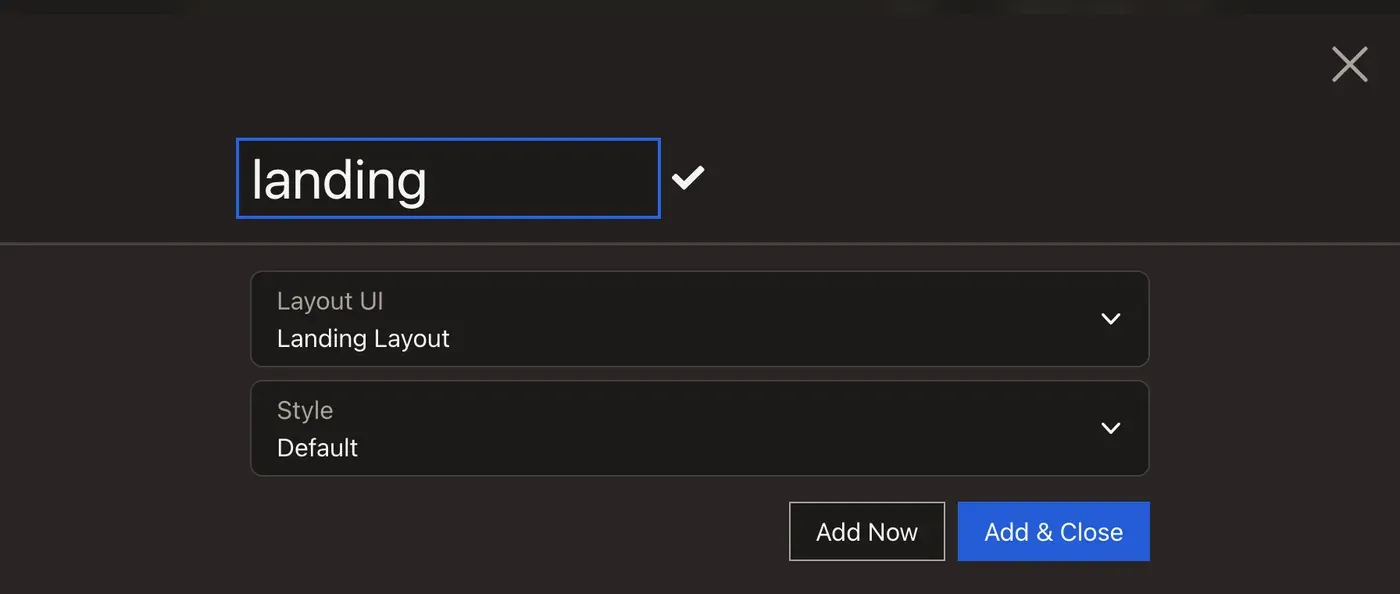
/_cwa/layouts, clicking +, typing the reference landing, choosing Landing Layout from the Layout UI select, clicking Add Now, and the new layout appearing in the list next to the template's ownVia fixtures
The template's fixtures are split into parts. api/src/DataFixtures/AppScaffold.php runs every class that implements ScaffoldPartInterface, highest getPriority() first, and flushes once after them. The interface's #[AutoconfigureTag] attribute registers each part, so a new one needs no service configuration. CoreScaffoldPart (priority 100) seeds the existing layout and home page.
Add your own part beside it. Create api/src/DataFixtures/Parts/LandingScaffoldPart.php:
<?php

declare(strict_types=1);

namespace App\DataFixtures\Parts;

use Silverback\ApiComponentsBundle\Fixture\CwaFixtureBuilder;

class LandingScaffoldPart implements ScaffoldPartInterface
{
    public static function getPriority(): int
    {
        return 50;
    }

    public function build(CwaFixtureBuilder $cwa, ScaffoldState $state): void
    {
        $cwa->layout('landing', 'Landing');    }
}
The first argument is the layout's reference; the second is the filename suffix, and the builder prepends CwaLayout itself. Don't call $cwa->flush() in a part: AppScaffold does it.
Load it from the project root:
docker compose exec php bin/console doctrine:fixtures:load --append
--append keeps what's already in the database and only creates what's missing, so the seeded home page and any edits you've made survive. See Appending to an Existing Site.
create-cwa removed AppScaffold.php and Parts/, so there's no scaffold to add a part to. Create the layout in the admin instead.Fixtures are the recommended approach for development — they give you a consistent, repeatable starting state, which is invaluable when switching feature branches or onboarding a new environment for a client. See Data Fixtures for the full scaffold API.
Next: Create a Page Template
A layout on its own isn't visible yet: nothing uses it. Next, Your First Page Template creates a page template and a page at /landing that renders inside it.