

Key Ideas
The guides build a layout, a page template and a component. They use a few CWA terms. Each one is explained here in a sentence or two, so you can start building. Core Concepts covers each idea in depth, and its Glossary defines every CWA term in one place.
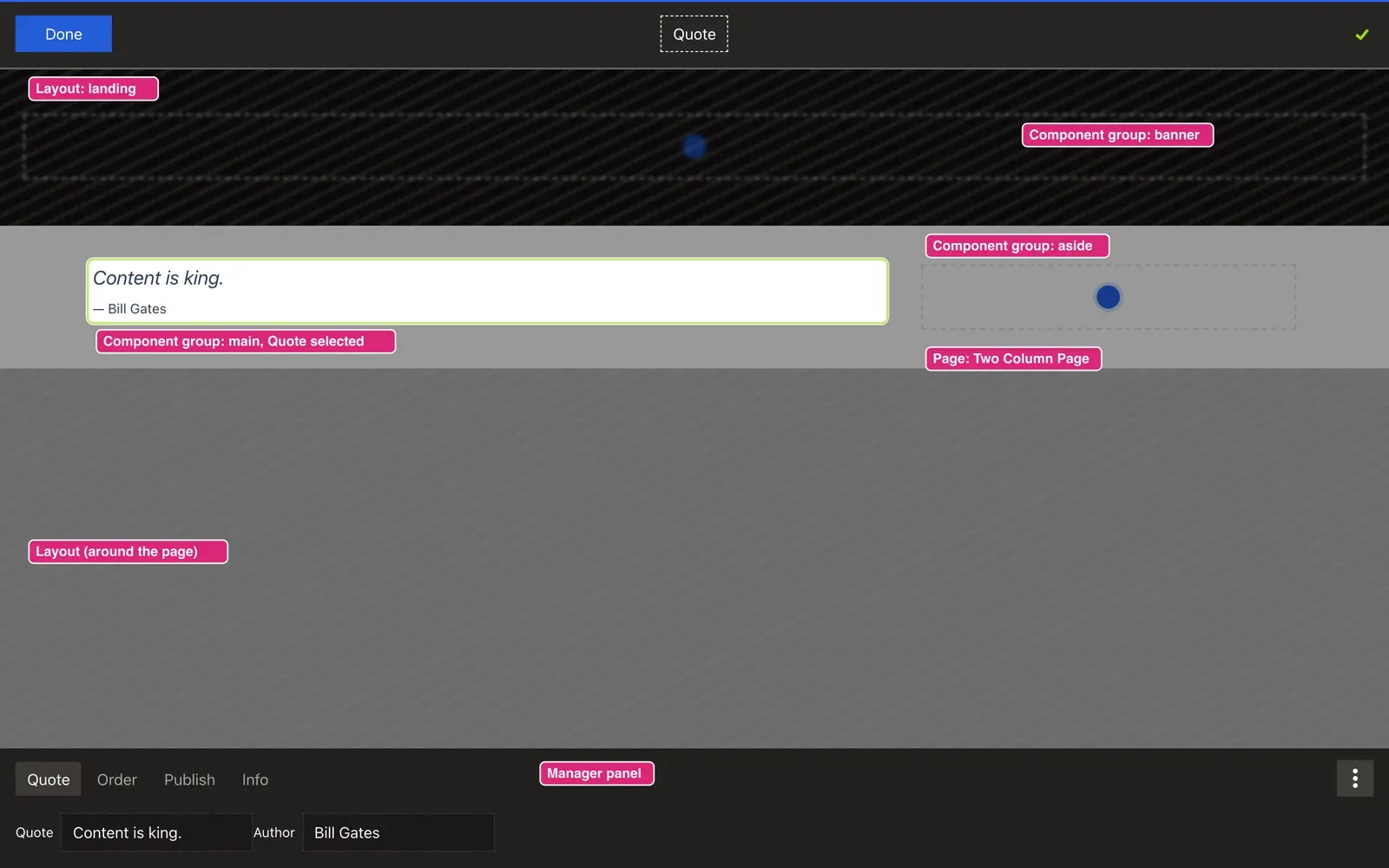
What a page is made of
Layout. The outer shell every page shares: header, footer, navigation. You write it as a Vue file in app/app/cwa/layouts/.
Page. The content structure inside a layout. Each page is a record in the database. It names the layout and page template it uses, and usually has a URL, called its route.
Page template. The Vue file that arranges a page's component groups on screen, in app/app/cwa/pages/. Many pages can use the same page template. In the admin it's the Page UI.
Component group. A named, ordered list of components, such as main or banner, that belongs to a layout, page or component. You declare one with <CwaComponentGroup reference="main"> in a layout, page template or component, and editors add components to it. The guides also call it a "group"; it's the same thing.
Component. One piece of content in a group: a title, a quote, an image. Each component type is a PHP entity that holds the data and a Vue file that displays it.
Component position. The record that places one component in a component group and sets its order. You rarely deal with positions directly: the admin creates them when an editor adds a component.
How records are identified
IRI. Every record in the API has an IRI, a path that identifies it, such as /_/pages/018e… or /component/titles/018e…. The module passes a record's IRI to its Vue file as the iri prop, and you pass an IRI to <CwaComponentGroup> as its location, to say which record owns the group.
uiComponent. The name of the Vue file that displays a layout, page or component, saved with it in the database. For the layout file landing.vue, it's CwaLayoutLanding. The admin's Layout UI and Page UI selects set it for you. Your First Layout explains the naming rule.
Editing
Editor. Anyone signed in with ROLE_ADMIN, who can change content. These docs say "editor" for the person, and "admin" for the screens and tools they use.
Edit mode. Signed in as an editor, you see the admin bar at the top of every page. Click Edit to turn on edit mode: an empty group shows a + to add content, and clicking a component selects it.
Manager panel. The panel that slides up from the bottom when you select something in edit mode. Its tabs hold the forms for editing the selected component. The tabs you write for a component type are its admin tabs, in its admin/ folder.
Draft and published. A publishable component has two versions. Editors change the draft; visitors see the published version until an editor clicks Publish.
Repeating content
Page data. One item of repeating content, such as one blog article, with its own fields and its own route. Each item is shown through a template page.
Template page. A page that is the shared design for one type of page data, such as every blog article. It has isTemplate: true and no URL of its own; each item of that type is shown through it. In the admin, a template page is a Dynamic page.
TwoColumnPageTemplate.vue). A template page is a page record shared by many page data records. A template page renders through a page template, like any other page. Your First Dynamic Page builds one.Next: Core Concepts
Core Concepts explains how a CWA site works, one idea per page. Then the guides build a site step by step. If you'd rather build first, you know enough to start with Your First Layout.