

Your First Dynamic Page
Every page so far has its own URL and its own content. Repeating content, such as blog articles, events or products, works differently. Each item is a page data record with its own URL and fields, and they all share one template page for their structure.
This guide builds news articles. Each article has its own Quote, shown in the main component group of the TwoColumnPageTemplate you built in Your First Page Template. If you picked the blog feature, the template's BlogArticleData and BlogScaffoldPart are a complete working example of the same pattern.
TwoColumnPageTemplate.vue; the admin calls it the Page UI. A template page is a page record with isTemplate: true that many page data records share; the admin calls it a Dynamic page. This guide makes a template page that renders through the page template you already have.
The File
The Vue file already exists: articles render through TwoColumnPageTemplate.vue. The new file is the PHP entity for the articles' data.
Create api/src/Entity/NewsArticleData.php:
<?php

declare(strict_types=1);

namespace App\Entity;

use ApiPlatform\Metadata\ApiResource;
use App\Entity\Component\Quote;
use Doctrine\ORM\Mapping as ORM;
use Silverback\ApiComponentsBundle\Entity\Core\AbstractPageData;

#[ApiResource(mercure: true)]
#[ORM\Entity]
class NewsArticleData extends AbstractPageData
{
    #[ORM\ManyToOne(targetEntity: Quote::class)]     #[ORM\JoinColumn(nullable: true, onDelete: 'SET NULL')]     public ?Quote $quote = null;}
AbstractPageData gives each article a title and metaDescription, which the module uses for the page's <title> and meta description. The quote field holds the component each article shows. A field like this must be typed as a component class.
Generate and run the migration from the project root:
docker compose exec php bin/console doctrine:migrations:diff
docker compose exec php bin/console doctrine:migrations:migrate
As in the last guide, review the migration in api/migrations/ and delete its down(): the template's migrations are upward-only (see Bundle Setup › Database Setup).
Register in nuxt.config
Add a pageData entry, keyed by the class's short name:
// app/nuxt.config.ts
cwa: {
  pageData: {
    NewsArticleData: {      name: 'News Articles',      properties: {        quote: 'Article Quote',      },    },  }
}
name is how the admin lists the type at /_cwa/data and in its selects. properties gives each component field a label. Both are optional: without them the admin shows NewsArticleData and a label made from the field name.
Create in the API
Three records make a dynamic page work:
- a template page, with a component position bound to the
quotefield; - a page data record for each article, naming the template page;
- a route for each article.
That position is a dynamic component position. Instead of holding one component, it shows whatever component the current article holds in its quote field.
Via the admin
The template page. Go to /_cwa/pages → +. Switch the type select at the top from Static to Dynamic, give it the reference news-template, choose Two Column Page as the Page UI and the landing layout, and click Add Now. A template page has no route.
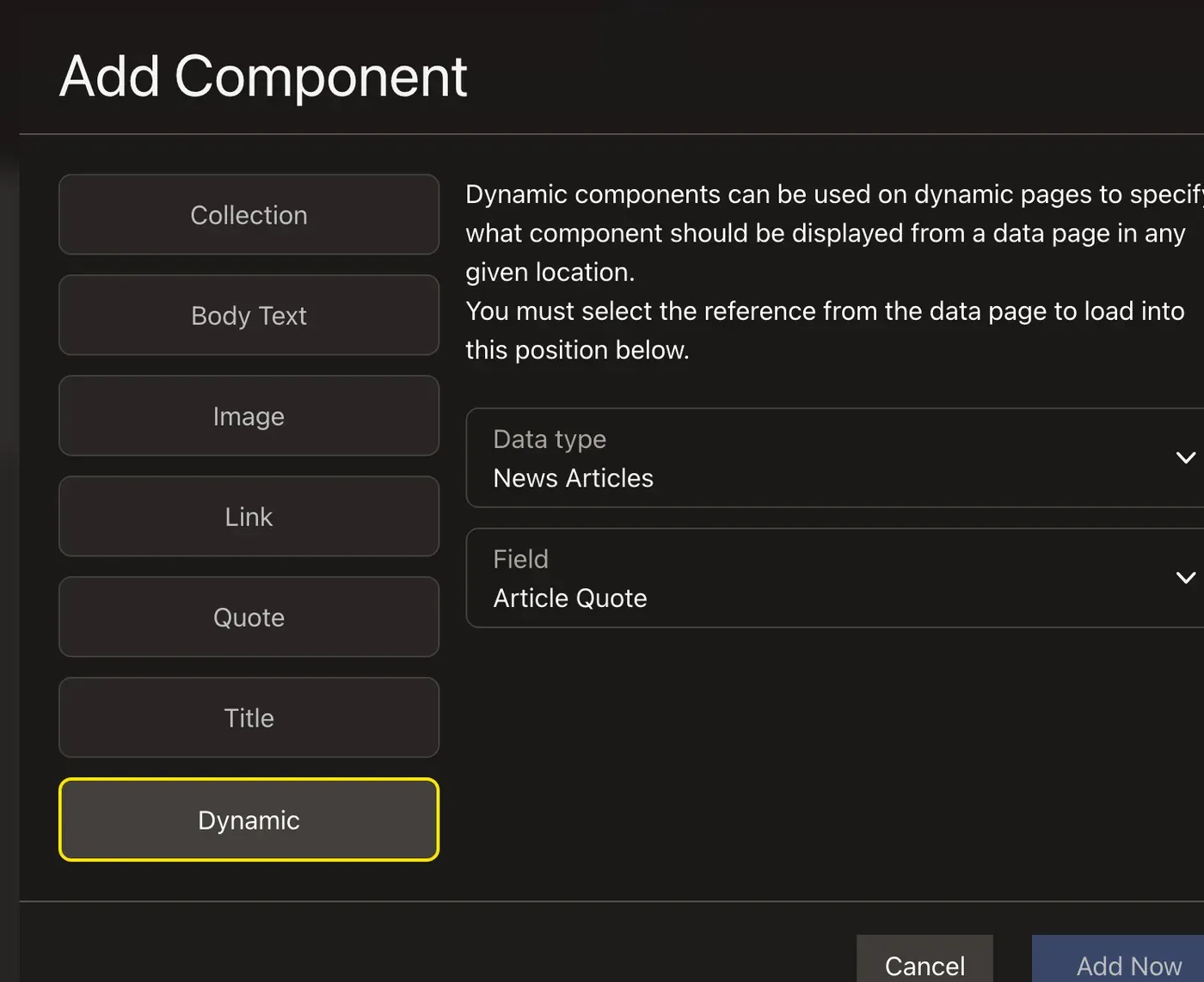
The dynamic position. Open the template page with the eye icon in its settings, and click Edit. Click + in the main group. The Add Component dialog has a Dynamic option as well as the component types: choose it, then News Articles as the Data type and Article Quote as the Field, and confirm.
An article. Go to /_cwa/data → News Articles → +. Give the article a title, choose news-template as its Dynamic Page, and click Add Now. It opens on its Routes tab: create a route with the path news/first-article.
Its quote. Visit https://localhost/news/first-article and click Edit. Select the dynamic position in the main group. Its Data Placeholder tab has an Add Quote button: click it, type the quote, and click Publish. The quote belongs to this article; the next article you create gets its own.
news/first-article, then on that page adding its Quote from the Data Placeholder tab and publishing itVia fixtures
Add to build() in api/src/DataFixtures/Parts/LandingScaffoldPart.php:
use App\Entity\Component\Quote;use App\Entity\NewsArticleData;
// ...

public function build(CwaFixtureBuilder $cwa, ScaffoldState $state): void
{
    // ... the landing layout and page from the earlier guides

    $cwa->page('news-template', 'TwoColumnPageTemplate', layout: 'landing', isTemplate: true)        ->group('main')->pageDataPosition(NewsArticleData::class, 'quote');
    $quote = new Quote();    $quote->text = 'News is what somebody does not want you to print.';    $cwa->publish($quote);
    $article = new NewsArticleData();    $article->setTitle('First article')        ->setMetaDescription('The first news article.');    $article->quote = $quote;
    $cwa->pageData($article, template: 'news-template', route: '/news/first-article');}
isTemplate: true makes the page a template page, so it gets no route. The Quote is saved with the article, because it's set on the article's quote field. pageDataPosition() takes the page data class and the field name, and creates the dynamic position in the main group. pageData() takes the template page's reference, not its uiComponent.
Load it from the project root:
docker compose exec php bin/console doctrine:fixtures:load --append
--append keeps anything that already exists. An article whose route path already exists is kept as it is, and so is its quote, so a second load doesn't create another one. A group that already exists is kept too, without new positions, as in Your First Component. See Appending to an Existing Site.Visit https://localhost/news/first-article: the landing layout wraps the two-column page, and the main group shows this article's quote.
Next: How Dynamic Pages Work
You've built every piece the guides cover. Dynamic Pages explains how page data, template pages and dynamic positions fit together, and the API's Page Data & Nested Pages covers collections, nested pages and route generation.