

Page Caching
The module lets a shared cache (Souin, in the template) store the HTML that Nuxt renders. It sets the headers; the shared cache stores the page and drops it when the API purges. Page caching is on by default.
Configuration
// nuxt.config.ts
export default defineNuxtConfig({
  cwa: {
    pageCache: {
      enabled: true,            // default
      sharedMaxAge: undefined,  // optional cap, in seconds. Default: unset, so the API decides
      staleWhileRevalidate: 0,  // default: off
    },
  },
})
Set enabled: false to turn it off.
What a Cached Page Carries
When a page can be cached, the module sets two headers:
Cache-Control: public, max-age=0, s-maxage=31557600
Surrogate-Key: cwa-html, /_/pages/8f3c…, /_/component_groups/4d5e…, /component/titles/1a2b…, …
Surrogate-Keylists the IRI of every CWA resource used to render the page, plus the constant keycwa-html. When the API saves a resource, it purges that resource's IRI, and every page that used it is dropped. Saving site config purgescwa-html, which drops every page. See Purging Every Rendered Page.max-age=0is fixed. A browser's cache can't be purged, and a stale page that points at an old build's/_nuxtfiles loads blank.stale-while-revalidateis added only when you setstaleWhileRevalidate.
cwa-html is a contract shared with the API bundle. Both sides must use the same name, or the purge matches nothing and pages stay stale until they expire.Cache-Control and Surrogate-Key headers.How Long a Page Is Kept
A page's s-maxage is the lowest of:
pageCache.sharedMaxAge, if you set it- the
s-maxageof every API response fetched during the render (or itsmax-age, if it has nos-maxage) - the time left until any API response's
Expires, measured against that response's ownDateheader
The API shortens its responses ahead of anything scheduled: a component's future publishedAt arrives as Expires, and an upcoming route go-live caps s-maxage on routes, pages and manifests (Scheduled Publication and Cache Lifetime). So a page is never kept past a scheduled change, even though no save happens at that moment.
If none of these supplies a value, the page is kept for one hour.
By default sharedMaxAge is unset, so a page lasts as long as the API responses it used: one year in the template's production API, and 60 seconds in development. A long lifetime is safe because the API purges a page when any resource on it is saved, site config purges every page, scheduled changes shorten the lifetime in advance, and each deploy purges and warms the cache.
sharedMaxAge if your pages render anything the API doesn't provide. Only CWA resources are tagged for purging. A date rendered on the server, a third-party fetch, or a useAsyncData call outside CWA is never purged, so with the default lifetime it stays in the cached page for up to a year. sharedMaxAge caps every page, for example sharedMaxAge: 3600 refreshes them at least hourly. It can only shorten a page's lifetime, never extend it past the API's.Go-live capping uses the soonest scheduled go-live across all routes. While any route is waiting to go live, every page's lifetime is shortened to that moment.
When a Page Is Not Cached
The module marks a page private, no-store when:
- the visitor is signed in, or
- any API response used in the render was
privateorno-store. The API sends this for an admin's draft view.
A 4xx API response doesn't count towards the page's headers. A 5xx still does, because nothing purges the page once the API recovers.
A page response with any status other than 200 (a redirect or an error) gets no-store. The module recognises an error render by Nuxt's ssrContext.error, so a page that throws while rendering is never cached. So does any render where the page's own route or resource failed to load.
A render that is missing a component is not cached either. That's when a fetch for one of the page's resources still fails with a 5xx or a network error after its retry, or the server's wait for a resource being fetched times out after 10 seconds. The page is sent with the component missing, but marked no-store, so the next visitor gets a fresh render instead of the broken one for the API's full lifetime. A 4xx, such as a 404, doesn't count: the page renders without that resource and is cached as usual, unless the failed resource is the page's own route or resource.
A component that isn't published yet doesn't stop the page that places it being cached. The API leaves the component out of the component position for a visitor, so the module renders nothing there and makes no request. The cached page carries the component's tag and expires when a scheduled component goes live, and publishing the component purges the page.
A page that used no CWA resources, or whose lifetime works out as zero, gets no cache headers from the module.
Purging All Cached Data
A purge by tag only reaches what the API knows has changed. If data changed some other way, such as a direct database edit, a data fix or an import, the cached API responses and pages still hold the old data. When you know which pages it affects, purge those pages (see Purging One Page). Flushing the whole cache is a last resort, because every page is then slow until it has been rendered again. To flush it:
- in site settings, click Purge all cached data and confirm, or
- call
$cwa.siteConfig.purgeHttpCache(), which sendsPOST /_/http_cache/purge, or - run
php bin/console silverback:api-components:purge-http-cachein the API container.
All three drop every cached response, API and page HTML together. There is no way to flush only the API responses. With Cloudflare edge caching configured, a flush also purges everything in the Cloudflare zone (see Purges must reach Cloudflare). See Flushing the Whole HTTP Cache for how the API does it.
The site settings action is shown even when pageCache.enabled is false, because the API cache exists either way. The section is then titled Cached data and the page-cache buttons are hidden. With page caching on, a successful purge offers Warm page cache now, because every page is a cache miss until it is rendered again.
501 and site settings reports Nothing was purged.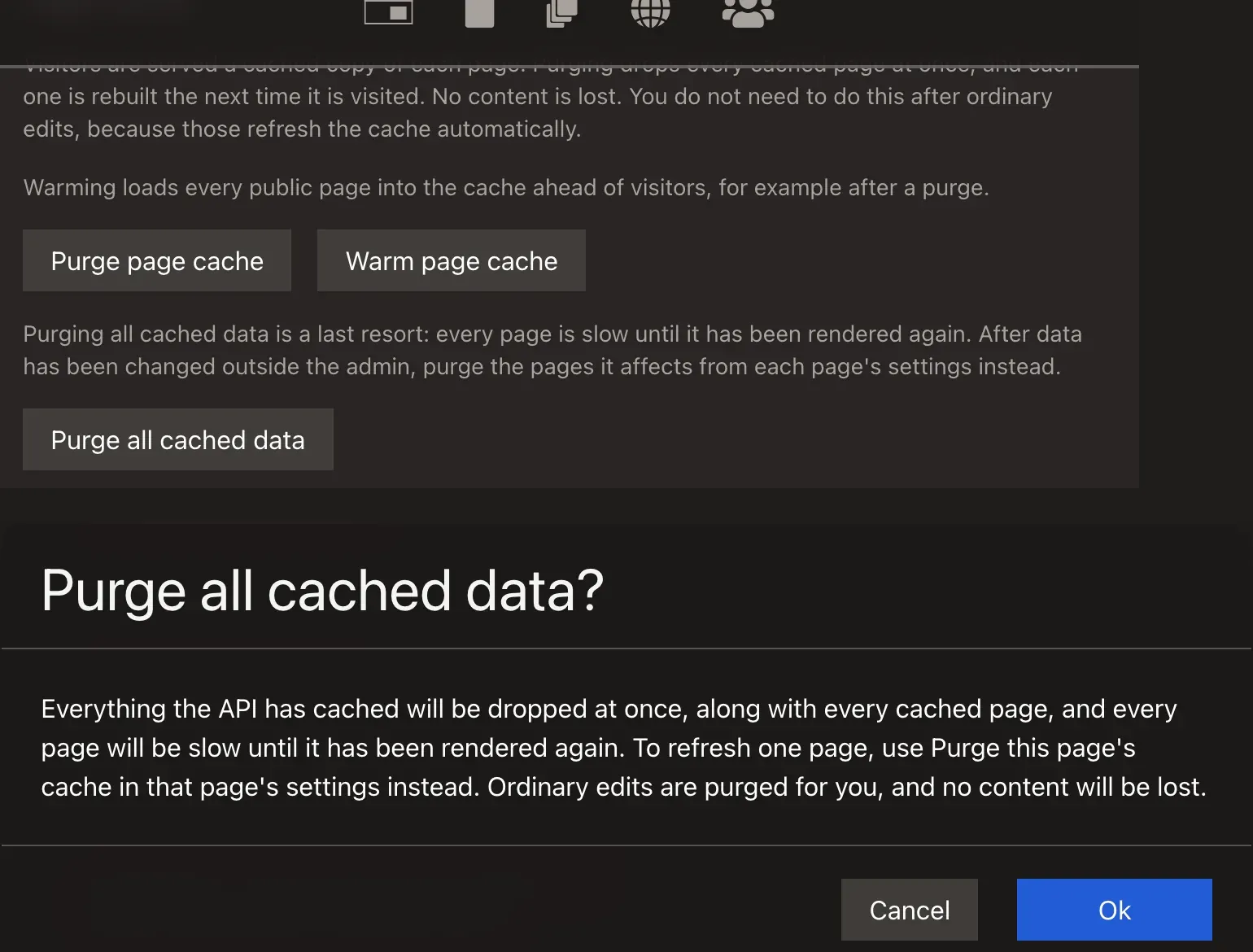
Purging One Page
From the page's settings
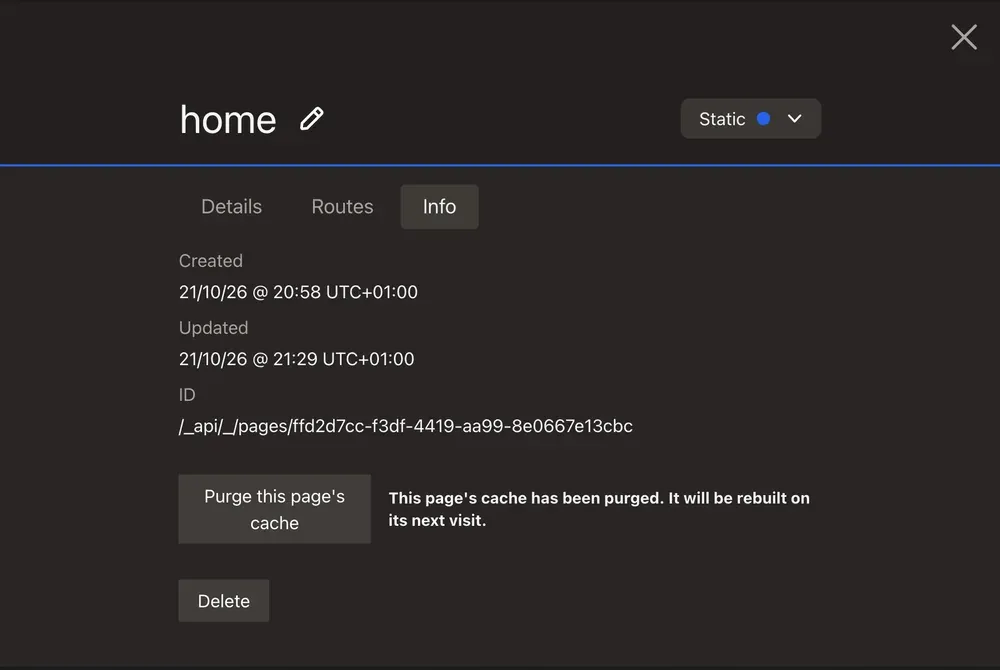
An admin can purge the page on screen from its settings. Click the page's name in the admin bar to open its settings, open the Info tab and click Purge this page's cache, then confirm. It drops the page's cached HTML and the cached API data it is built from, and they're rebuilt on the next visit. Other pages that share its layout or components are rebuilt too, because they carry the same tags. With Cloudflare edge caching, the purge reaches the edge as well when purges reach Cloudflare.
The button is shown only when the settings are open for the page on screen, because it uses that page's loaded manifest. It sends one POST /_/http_cache/purge with a body:
paths: the route path of each page in the manifest (a nested page has one per depth)tags: every IRI in the manifest, plusmanifest:<IRI>for each page and page data
The API purges only those tags and never flushes. See HTTP Caching › Purging One Page or Tag › From the API. The result is shown beside the button:
| Result | Message |
|---|---|
| Purged | This page's cache has been purged. It will be rebuilt on its next visit. |
401 or 403 | This page's cache could not be purged: your account does not have permission to do this. |
501 | Nothing was purged. This deployment's cache cannot purge single pages. |
422 | Nothing was purged. The API did not accept this page's cache tags. |
| Anything else | This page's cache could not be purged (status). Please try again. |
From the command line
To drop one page from the cache, and from Cloudflare when purges reach it (see Cloudflare › Purges must reach Cloudflare), run this in the API container:
php bin/console silverback:api-components:purge-http-cache --path /about-us
--path purges the tag that a change to the route at that path purges, which every page using the route carries. --tag purges any tag, and both can be repeated. See HTTP Caching › Purging One Page or Tag.
Without the command, purge the route's tag through Caddy's admin API, inside the API container. It answers 204:
curl -X PURGE -H 'Surrogate-Key: /_api/_/routes//about-us' http://localhost:2019/souin-api/souin
The tag is the route's IRI, so the path's leading / gives two slashes. -H 'Surrogate-Key: /about-us', the path Souin tags every entry with, and a regex purge (/souin-api/souin/<regex>) clear Souin's store only, never Cloudflare's. Nothing purges Cloudflare by URL; use Cloudflare's own purge_cache API with files for that.
PURGE to the page's URL. It never purged anything. The site answers PURGE and BAN with 405.Warming the Cache from Site Settings
After a purge, every page is a cache miss until someone visits it. An admin can refill the cache from site settings with Warm page cache, which shows live progress. It calls $cwa.siteConfig.warmPageCache(), which posts to the module's server route POST /_cwa/page-cache/warm.
The warm runs on the Nuxt server, not in the admin's browser. The browser's requests carry the auth cookie, and the shared cache deliberately skips those, so nothing would be stored. Instead, the server reads the same page list as the sitemap and requests each page anonymously through the in-cluster origin, with the Host header set to the site's public host. Each response is stored under the same cache key visitors use.
- Only admins can start it. The route checks the role through the API, and returns
403otherwise. - One warm runs at a time per Nuxt server process. A second request to the same server gets
409while one is running, but separate replicas can warm at the same time. - Only a
200counts as warmed. The result lists every other page with its cause:/about (308 → https://www.example.com/about)for a redirect,/about (no response: DEPTH_ZERO_SELF_SIGNED_CERT)when the request got no response, or/about (timed out). The page list already leaves out redirect routes, so a3xxhere means the request never reached the renderer.
Settings live in the server-only runtime config, so they can be set per environment with NUXT_CWA_PAGE_CACHE_WARM_* variables:
export default defineNuxtConfig({
    runtimeConfig: {
        cwa: {
            pageCacheWarm: {
                concurrency: 3,  // pages at once, capped at 10
                timeout: 30000,  // per page, in milliseconds
                origin: '',      // defaults to the origin of apiUrl
            },
        },
    },
})
In the template's Kubernetes deploy, set them as CI variables: every NUXT_* CI variable reaches the Nuxt pods. See CI/CD › Site settings.
Choosing the Warm Origin
origin (NUXT_CWA_PAGE_CACHE_WARM_ORIGIN) is where the warm connects. It defaults to the origin of the server's apiUrl, and the public host travels in the Host header, so the page is stored under the key visitors hit and the request never leaves your network.
On Kubernetes, leave it unset. The chart runs Caddy with SERVER_NAME=:80: plain HTTP, no redirect, so the derived origin (http://<fullname>) already works.
On a single server where Caddy runs its own automatic HTTPS, you must set it, and to a different URL from the one the server renders with:
| Example | Why | |
|---|---|---|
Rendering (apiUrl) | http://php.local/_api | Over HTTPS the TLS name would be the internal host, which only an internally issued certificate covers. |
Warming (NUXT_CWA_PAGE_CACHE_WARM_ORIGIN) | https://php.local | The warm sends the public Host, so the TLS name is your real domain and its ACME certificate validates. |
The template's compose.prod.yaml sets both; see Production Docker Compose.
Over plain HTTP on that setup, Caddy answers every page with a 308 to HTTPS, so every page is reported failed and nothing is warmed.
reverse_proxy sets X-Forwarded-Proto from the scheme it received, so the pages would be rendered and cached with http:// canonical and og:url values, for the API's full cache lifetime.When Caddy issues the certificate itself (SERVER_NAME=localhost, a .local host or tls internal), the warm fails with DEPTH_ZERO_SELF_SIGNED_CERT, because Node doesn't trust Caddy's local root. Give Node the root with NODE_EXTRA_CA_CERTS, or install it in the system trust store and start Node with --use-system-ca. In the template, the root is at /data/caddy/pki/authorities/local/root.crt in the php container's caddy_data volume. The Nuxt container doesn't mount that volume, so copy the file out or mount it.
The template's local development stack already sets NODE_TLS_REJECT_UNAUTHORIZED=0 on the Nuxt container, so the default origin works there.
The deploy pipeline has its own warm step, which does the same job after each deploy: see CI/CD.
Deployment Requirements
- The shared cache must purge by
Surrogate-Key. The template's Caddyfile caches page HTML on the same Souin store that the API purges. It caches only paths with no file extension, and.xmlfor the sitemap, so static files inpublic/are never cached. See Docker › What the page cache stores. - The page's cache key must not include
Accept. Each browser sends a differentAcceptheader for the same HTML, so a key that includes it stores one copy per browser, and a page cached for one browser is a miss for the next. The template keepsAcceptin the key for/_api*only. API responses do depend on it, and API Platform's Swagger UI response sends noVary: Accept, so without it a cache hit could serve HTML to a JSON-LD client. - Normalise
Accept-Encodingbefore a cache that stores compressed pages. The template's Caddyfile hasorder cache before encode, so a page is compressed once, on the miss, and a hit is served without compressing it again. It first rewritesAccept-Encodingtobr,gzipor nothing and puts that value in the cache key, so each page is stored at most three times. With the raw header in the key, the cache would keep one copy for every value browsers send. With the cache insideencodeinstead, pages are stored uncompressed and every hit is compressed again: Brotli capped a php pod at about 110 page views a second. See Docker › Compressed cache entries for the Caddyfile lines. - The shared cache must skip requests that carry the auth cookie. The module sends no
Vary: Cookie, because it would ruin the hit rate. A cached page is always an anonymous one, so this is not a leak, but a signed-in admin served a cached page sees no admin controls or draft content. - A CDN in front must not cache pages unless purges reach it. Otherwise an edited page stays stale at the edge for as long as the CDN keeps it. See Cloudflare.
useFetch, a geo banner, an A/B test), turn page caching off or exclude those paths from the shared cache.isr, swr and prerender route rules don't mix with this. Nitro's own cache isn't purged by the API, so edits don't appear until the route rule expires. The module warns at build time when both are on./_nuxt file names without changing any resource, so nothing purges cached pages. The template's Souin store is in memory in the php container, so it is emptied whenever that container restarts. If you deploy the Nuxt app on its own, or put a persistent CDN in front, cached pages can point at files that no longer exist until they expire.Purge the pages after every front-end deploy, once the new Nuxt pods have fully replaced the old ones. Run php bin/console silverback:api-components:purge-rendered-html in the API container, or send POST /_/rendered_html/purge as an admin (it returns 204). Both purge only cwa-html, so cached API responses are kept. If the cache refuses the purge or can't be reached, the command prints the reason and exits 1, and the endpoint returns 502, so a deploy script can rely on either. The template's pipeline already does this: see CI/CD.Origin Protection
The template's Caddyfile also stops made-up URLs and floods of requests from getting past the cache: it keeps only the query parameters pages read, strips tracking parameters, and rate-limits cache misses. These are deployment settings, not module options, so they're on Origin Protection.
PWA & Offline
Add safe service-worker caching and offline support to a CWA app — without ever serving a cached draft to the public.
Deploying a CWA Site
Choose between one server with Docker Compose (a preview) and Kubernetes with Helm, then take a new site to production on Kubernetes step by step, with the template's GitLab or GitHub pipeline.